Canopy
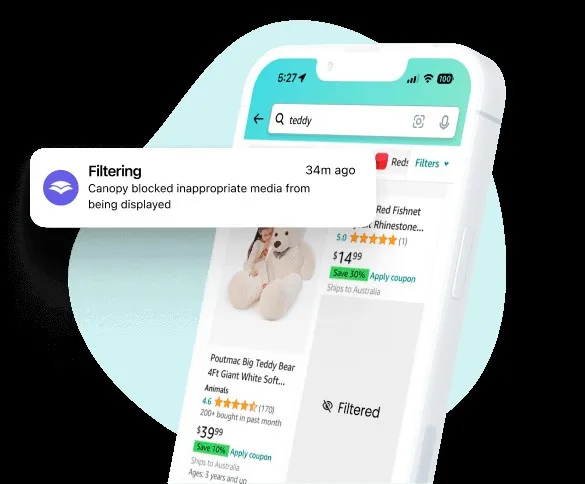
Filters explicit content in real time — without blocking the whole app.
Canopy filters explicit content out of the apps kids already use in real time, rather than blocking those apps — a strong fit if content exposure is the specific worry, less so if you want full activity monitoring.
Pros & cons
- The AI filter works inside mixed-content platforms — TikTok, Discord, Reddit, AI chatbots — rather than blocking them wholesale, according to independent reviews
- Sexting and nudity detection with alerts, a feature most competitors in this category don't offer
- Kids can request access to a filtered item, which reviewers note opens a conversation instead of a silent block
- Support response times are a consistent strength across user reviews
- No text-message or social-media DM monitoring beyond sexting alerts, according to reviewers
- iOS functionality lags Android, a limitation shared across most parental-control apps due to Apple's platform restrictions
- Screen-time controls are coarse — no per-app time budgeting the way dedicated screen-time apps offer
- At least one independent tester reported a geofencing alert failing to fire when a phone left the house
How it works
Canopy runs an AI filter that scans images, video, and text in real time inside apps kids already use — including TikTok, Discord, Reddit, and AI chatbots like ChatGPT, Claude, Gemini, and Grok — and removes or blurs explicit material rather than blocking the app or site outright, according to the manufacturer. Beyond filtering, the app bundles sexting and nudity-detection alerts, app blocking, screen-time scheduling, location tracking with geofencing, and anti-tampering protection, all managed from a parent dashboard.
Who should buy it
Canopy fits families who want a kid to stay on the same mainstream apps their peers use, with explicit content filtered out in the background, rather than cutting off access to those apps entirely. It's a particularly strong fit for parents specifically worried about sexting or AI-chatbot exposure, since independent reviewers consistently flag that detection as Canopy's clearest differentiator.
Who should skip it
Families who need deep message or DM monitoring, or fine-grained per-app time budgets, will find Canopy's coverage thinner than dedicated tools built for that. And Canopy isn't the right pick for a household that has already decided it wants visibility and trust rather than enforcement — a tool that reports activity to a parent without touching the content, like Covenant Eyes, serves that goal more directly than a tool built to actively filter and block.
The bottom line
Canopy is a real-time content filter first and a monitoring app second — it's built to remove explicit material from the apps a kid is already using, not to report on everything they do. That makes it a strong, narrow tool for content-exposure risk, and a weaker fit for parents who want comprehensive activity oversight.
Vs. closest alternative
These two tools solve different problems. Covenant Eyes doesn't filter or block anything — it reports browsing activity to a person you trust and relies on that visibility to change behavior, which suits older teens and a trust-based household. Canopy actively intervenes: its AI detects and removes explicit content in real time, and it can block apps and set schedules outright, which suits younger kids or situations where a parent wants enforcement rather than a conversation starter. A household could reasonably use either depending on the child's age and how much autonomy they're ready for, but they're not really substitutes for each other.
Filters explicit content in real time inside the apps kids already use, instead of blocking those apps outright.
FAQ
Does Canopy block entire apps or websites?
Not by default for its core filter — it scans and removes explicit images, video, and text inside a platform while leaving the rest of the app usable, according to the manufacturer. It also offers separate, traditional app-blocking and scheduling controls for parents who want to cut off specific apps entirely.
What does Canopy cost?
As of this review, Canopy runs $8.33 to $12.50 per month billed annually, depending on how many devices you need covered (1 device up to 10), with a 7-day free trial and a 30-day money-back guarantee, according to the manufacturer.
Does Canopy work as well on iPhone as on Android?
According to independent reviews, Android support is stronger than iOS, largely because Apple's platform restrictions limit what any parental-control app can do at the OS level — a limitation Canopy shares with most competitors in this category.