Covenant Eyes (Victory)
Activity reports and trusted allies — not a blocker.
Reports browsing activity to a person you choose rather than blocking anything itself — a real accountability tool, not a parental-control app in the blocking sense.
Pros & cons
- One household subscription covers up to 10 people, unusually generous compared to per-device parental tools
- Reports go to a chosen 'ally' — a parent, spouse, or accountability partner — rather than just logging silently
- 25 years in the category and 1.7 million-plus users, with an established track record
- Free trial available before committing to a paid plan
- Does not block content, set screen-time limits, or track location — it reports and alerts, it doesn't restrict, according to independent reviews and the product's own positioning
- Branding and default framing lean heavily toward adult pornography accountability and Christian audiences, which may not fit every family looking for general parental oversight
- Meaningfully pricier than blocking-first competitors in this category for what is a narrower feature set
How it works
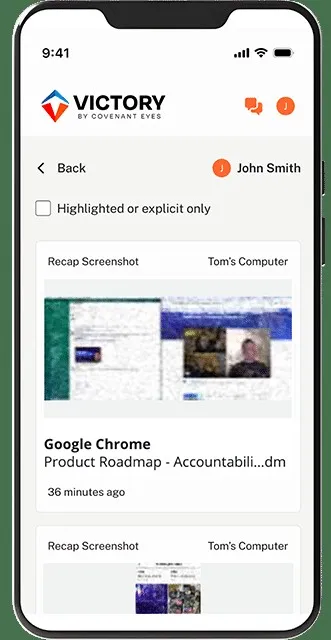
According to the manufacturer, Covenant Eyes (rebranded under the "Victory" product name) runs on a phone or through browser-based access and generates activity reports on what was viewed, sending them to one or more people the account holder chooses — a spouse, parent, or accountability partner. The design assumes visibility changes behavior on its own; there is no separate blocking layer stopping a site or app from loading.
What it doesn't do
This is the detail most comparisons undersell. Independent reviews are consistent that Covenant Eyes is a monitoring and accountability product, not a parental-control product that happens to also monitor — it has no screen-time limits, no app blocking, and no location tracking. Families expecting a Bark- or Qustodio-style restriction layer will not find one here; the entire mechanism is a human seeing a report, not software enforcing a rule.
Pricing and what's covered
Per current published pricing, plans run about $18–20 per month, with discounted annual ($198/year) and one-time lifetime ($950) options. A single family subscription covers up to 10 people in the same household — generous relative to competitors that charge per device.
Who should buy it
Covenant Eyes suits families or individuals who specifically want accountability through visibility — someone trusted seeing what was browsed — rather than software enforcing restrictions a determined teenager might find a way around anyway. It's also a natural fit for the specific use case it was originally built around: adult pornography accountability, individually or as a couple, which most general parental-control apps don't address at all.
Who should skip it
Anyone who wants screen-time limits, app blocking, or location tracking for a child's device needs a different tool entirely — Covenant Eyes doesn't do any of that. Families who want that kind of hard restriction should look at a dedicated parental-control app built around blocking, not just reporting.
The bottom line
Covenant Eyes is honest about what it is: a way to make browsing visible to someone you trust, not a way to stop it. That's a real, useful mechanism for the right situation, and the wrong tool entirely if what you actually need is a blocker.
Reports what was browsed to someone you trust — it doesn't block anything itself, which is either exactly the point or a dealbreaker depending on what you need.
FAQ
Does Covenant Eyes block websites or apps?
No. According to independent reviews and the product's own positioning, it generates activity reports for a chosen ally rather than blocking content — there is no restriction layer stopping a site or app from loading.
Can one subscription cover a whole family?
Yes. A single household plan covers up to 10 people, according to current published pricing — more generous than per-device competitors.
Is there a discount available?
Screen Free Zone readers can get 30 days free with promo code SCREENFREE. The code applies to website purchases only — create the account on covenanteyes.com first, then install the app; it can't be redeemed through a direct Apple or Google app-store signup.