Time Timer Original (12-inch)
See time disappear. No phone, no app, no alarm to silence.
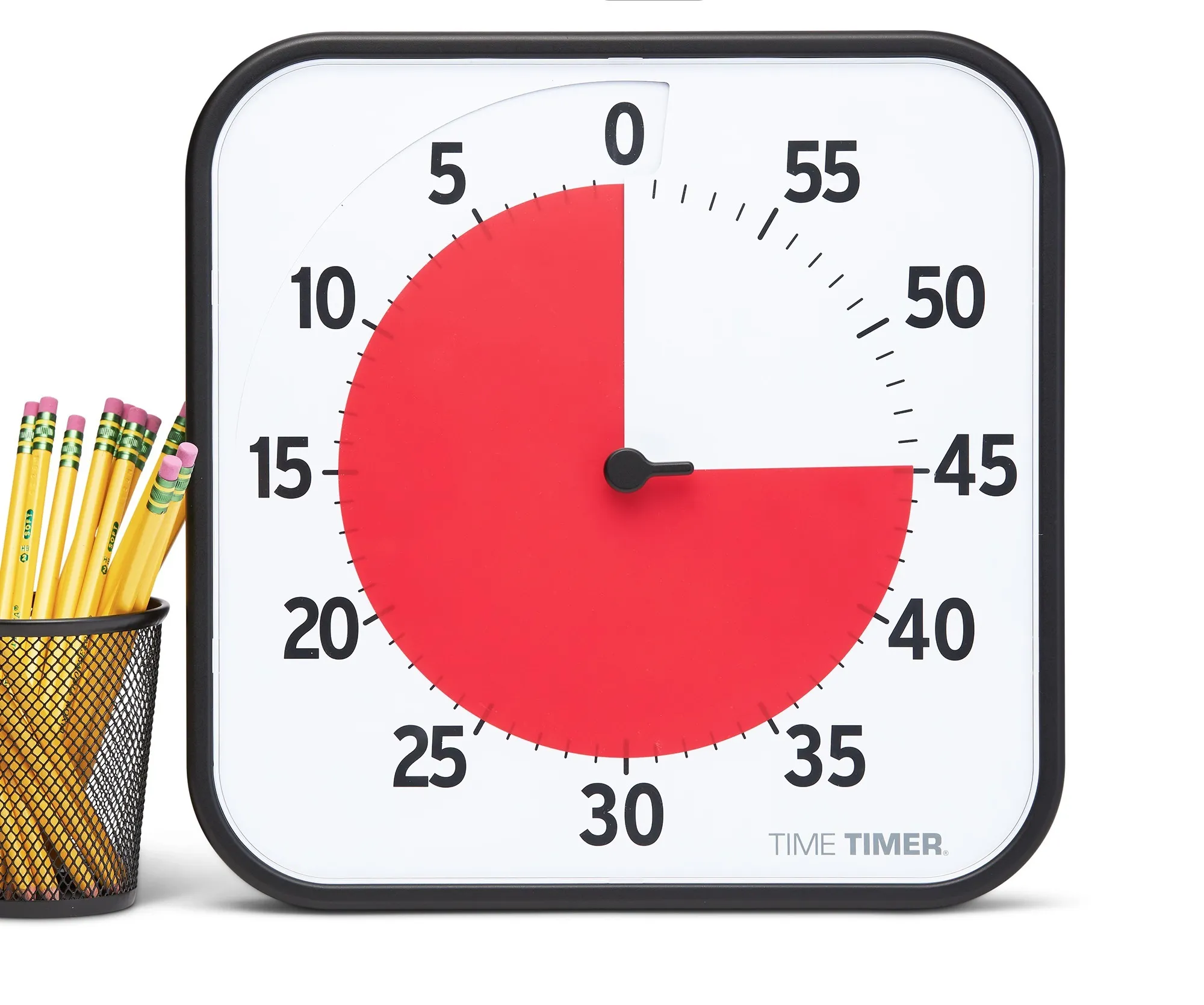
A dial timer that shows time disappearing as a shrinking red disk rather than counting down in digits — built originally for classrooms, effective for any time-boxed work block. No app or phone required.
Pros & cons
- Time is visible at a glance as a shrinking red disk — no mental math, no glancing at digits
- Silent operation by default, with an optional end-of-timer alert
- Magnetic backing for mounting on a whiteboard or metal surface
- Fully adjustable to any duration up to 60 minutes, not locked to presets
- 30+ years on the market and classroom-tested, with a Teacher's Choice Award
- Requires 2 AA batteries (not included) to run, despite the simple analog-style design
- Includes a year of Time Timer app access, which some buyers may not want or use
- Larger and less portable than a pocket timer like the TickTime Cube
How it works
According to manufacturer specifications, the Time Timer uses a red disk behind its dial face that visibly shrinks as time elapses, rather than counting down in digits. You set the duration by turning the dial, up to a full 60 minutes, and the disk disappears at the same rate — a glance tells you how much time is left without reading a number. The timer runs silently by default; an end-of-time alert is optional.
Build and what it needs to run
The 12-inch model measures roughly 11.8 x 11.8 x 1.6 inches and has a magnetic back for mounting on a whiteboard or other metal surface, per the manufacturer. Despite its simple, largely mechanical-looking face, it requires 2 AA batteries (not included) to operate — it is not a fully mechanical device. It also ships with a dry-erase activity card and a year of access to the companion Time Timer app, though neither is required for the core visual-timer function.
Who should buy it
The Time Timer suits anyone who wants a fully adjustable, glanceable countdown for focus blocks, meetings, or transitions — not just classrooms. Because the duration isn't locked to presets, it works equally well for a 12-minute task or a 55-minute deep-work block. Its visibility at a distance also suits shared or group settings, like a desk visible to a whole room.
Who should skip it
Anyone who wants a small, pocketable timer that requires zero setup per session should look at the TickTime Cube instead — its flip-to-start preset faces trade the Time Timer's full adjustability for speed and portability. The Time Timer is also a poor fit for anyone who specifically wants a battery-free device, since it does require batteries despite its analog appearance.
The bottom line
A dial timer that shows time disappearing as a shrinking red disk rather than counting down in digits — built originally for classrooms, effective for any time-boxed work block. It needs batteries to run, but no app, account, or phone.
Vs. closest alternative
Both keep time visible without a phone, but they trade adjustability for portability in opposite directions. The Time Timer's dial can be set to any duration up to 60 minutes and stays visible across a room, at the cost of being a fixed desk object that needs 2 AA batteries. The TickTime Cube is pocket-sized and starts a session with a flip, but its durations are limited to preset faces. Choose the Time Timer if you want full control over duration and shared visibility; choose the TickTime Cube if you want something small enough to carry and instant to start.
A shrinking red disk instead of digits — built for classrooms, effective for any time-boxed focus block.
FAQ
Does the Time Timer need batteries?
Yes — despite its simple analog-style face, it requires 2 AA batteries (not included), according to manufacturer specifications. It is not a fully mechanical, battery-free device.
Can I set it to any duration, or only fixed presets?
Any duration up to 60 minutes — you set it by turning the dial, the same way you'd set a kitchen timer. There are no fixed presets.
Do I have to use the companion app?
No. The timer's core function — visible countdown via the shrinking disk — works entirely on the device. The included year of app access is optional and not required to use the physical timer.