Freewrite Traveler
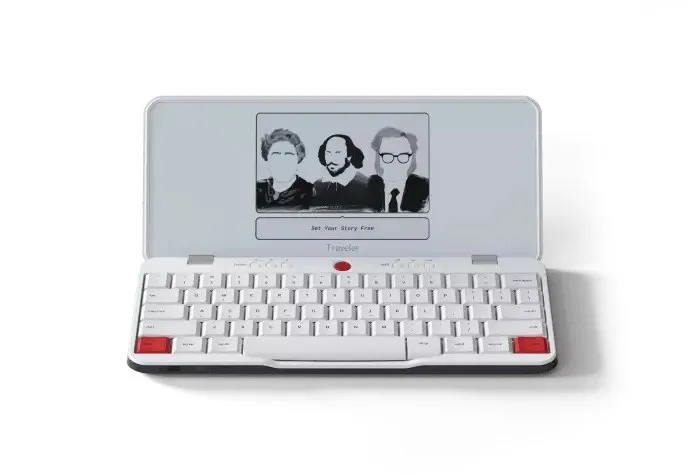
A keyboard and an e-ink screen. No browser, no email, nothing else.
A dedicated typing device with an e-ink screen and no browser or email — the most literal distraction-free option in the category, at the highest price.
Pros & cons
- No browser, no email client, no app store — there is nothing on the device to get distracted by
- Full-size keyboard with responsive scissor-switch keys, unlike touchscreen or stylus-based alternatives
- Battery life measured in weeks, not hours, according to manufacturer specifications
- Syncs drafts to Google Drive, Dropbox, and Evernote once you're back online, via the free Postbox app
- The most expensive device in this category, at ~$499–529
- Astrohaus's own affiliate/referral program (Refersion) has been closed since 2020, replaced by a non-cash rewards program
- Typing-only — no handwriting input, unlike the Supernote or reMarkable tablets
How it works
According to the manufacturer, the Traveler pairs a full-size mechanical-feeling keyboard with an E Ink display and intentionally omits a browser, email client, or app store — there is no way to check anything else on the device while writing. Drafts save locally and sync to cloud services like Google Drive, Dropbox, or Evernote through the free Postbox app once you're connected to Wi-Fi.
Build and battery
The Traveler weighs about 1.6 lbs and is built for portability, with battery life the manufacturer describes as lasting up to four weeks on a single charge — long enough that charging isn't a daily consideration the way it is with a laptop.
Who should buy it
The Traveler suits writers who specifically want to type, not handwrite, and who want a device that makes checking anything else physically impossible rather than just inconvenient. It's a strong fit for drafting first chapters, articles, or journal entries away from a laptop's tabs and notifications.
Who should skip it
Anyone who wants to handwrite rather than type should look at the Supernote Nomad or reMarkable Paper Pro instead. Budget-conscious buyers should also note this is the most expensive device in the category — a paper planner like the Hobonichi Techo delivers a similar level of digital-free focus at a fraction of the cost, if typed, searchable output isn't a requirement.
The bottom line
The Traveler is the most literal interpretation of "distraction-free" in this category — not a tablet with fewer features, but a device that physically cannot open a browser or an inbox. That focus comes at the highest price point here.
A full keyboard and an e-ink screen — no browser, no email, nothing to open mid-sentence.
FAQ
Can I handwrite on the Freewrite Traveler?
No — it's a typing device with a full keyboard, not a stylus-based tablet. For handwriting, the Supernote Nomad or reMarkable Paper Pro are the options in this category.
How do I get my writing off the device?
The free Postbox cloud app syncs drafts to services like Google Drive, Dropbox, and Evernote once the Traveler connects to Wi-Fi, according to the manufacturer.
Does Astrohaus have an affiliate program?
Their original Refersion-based affiliate program closed in 2020. They currently run a points-based Advocate Program instead, which isn't a standard cash-commission affiliate program.