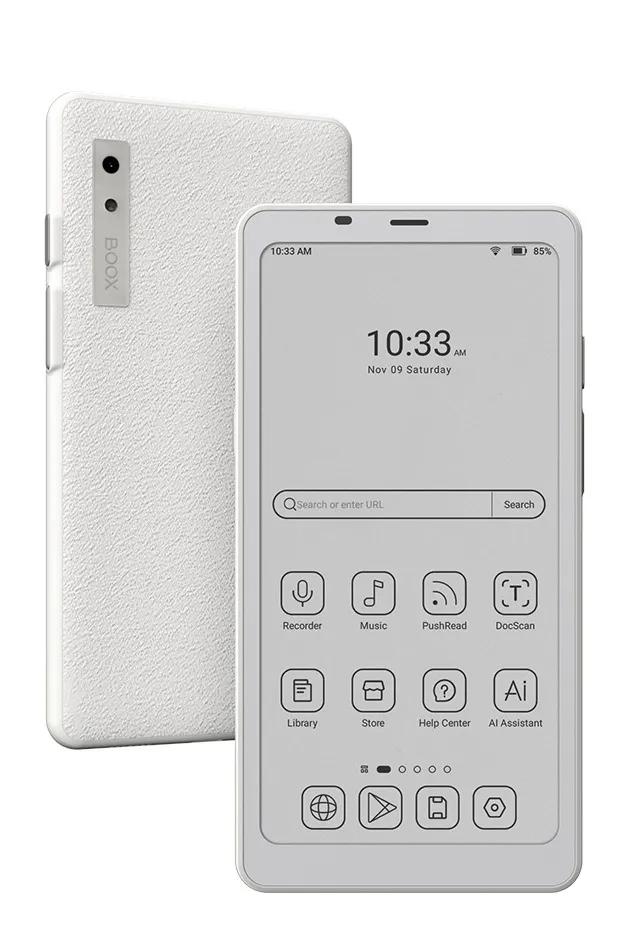
Onyx Boox Palma 2
Phone-sized e-ink. A pocketable alternative to scrolling.
A phone-shaped Android e-ink device — a genuine phone replacement for the right person, overkill for anyone who just wants to read.
Pros & cons
- Genuinely phone-sized and phone-shaped — fits in a pocket the way a dedicated e-reader doesn't
- Runs Android 13 and can install apps from the Play Store, including Libby, Kindle, or podcast apps
- Fast for an e-ink device — BSR (fast refresh) mode makes scrolling and typing noticeably smoother than older e-ink hardware, according to user reports
- Long battery life relative to a smartphone, since the e-ink screen draws far less power
- At ~$280–300, it costs more than a Kindle Paperwhite or Kobo Clara BW, according to user reports comparing prices across the category
- Ghosting — faint traces of previous screens — shows up more than on a dedicated e-reader, particularly in apps not built for e-ink, according to user reports
- The plastic body feels less premium than the Kindle Paperwhite's, according to user reports
- Running full Android apps on a slow-refresh screen is a genuinely different experience than using a phone — not a drop-in replacement for everyone
Hardware and build
According to manufacturer specifications, the Palma 2 has a 6.13-inch E Ink Carta Plus display, an octa-core processor, 6GB of RAM, and 128GB of storage (expandable via microSD). It's built into a genuinely phone-shaped body — 159 x 80 x 8mm, 170 grams — with a rear camera, fingerprint sensor, and speaker, features that exist because the hardware is closer to a phone than a typical e-reader.
Using it like a phone
Because the Palma 2 runs Android 13, it can install apps from the Play Store — Libby, Kindle, podcast apps, even messaging apps, if you want them. Onyx's BSR (fast refresh) mode speeds up the e-ink screen enough that basic navigation feels usable, though it's still a different experience than a phone's LCD: fast-moving content and color-dependent apps don't translate well to a slow, monochrome screen, which according to user reports is part of the appeal, since it's exactly what makes those apps less tempting to open.
Who should buy it
The Palma 2 suits people who specifically want a pocketable, phone-shaped device to replace their smartphone's day-to-day pull — someone who wants Libby, a podcast app, and basic messaging available, but on a screen too slow and colorless to invite scrolling. It's a narrower use case than a standard e-reader.
Who should skip it
If you just want to read books, a dedicated e-reader like the Kindle Paperwhite or Kobo Clara BW does that better and costs less. The Palma 2's price and app-running capability are only worth it if you specifically want the phone-replacement use case — otherwise you're paying more for flexibility you won't use.
The bottom line
The Boox Palma 2 is the most literal phone replacement in this category — same shape, same pocket, real Android apps — deliberately slowed down by its e-ink screen. That's either exactly what you want or a worse version of both a phone and an e-reader, depending on why you're looking.
Vs. closest alternative
The Kindle Paperwhite is a purpose-built reading device — cheaper, longer battery life for reading specifically, and a larger book catalog. The Boox Palma 2 is a different kind of product: a phone-shaped Android device that happens to use an e-ink screen, capable of running apps the Paperwhite can't. Choose the Paperwhite if you want the best reading experience for the money; choose the Palma 2 if you specifically want a pocketable phone alternative that still runs a few apps.
A real Android phone in e-ink form — technically capable of anything a phone can do, but slow enough that most of it stops being tempting.
FAQ
Can the Boox Palma 2 make phone calls?
No — it has no cellular radio, so it can't make calls or send SMS on its own. It connects via Wi-Fi only, so apps like Libby, podcast players, or Wi-Fi calling apps work, but it isn't a phone replacement in the literal sense.
Does the slow e-ink screen make Android apps hard to use?
Some apps, yes — especially anything with fast animation, video, or color-dependent interfaces. Onyx's fast-refresh mode helps for text-heavy use like reading, messaging, or browsing, but it's not a substitute for an LCD screen.
Is the Palma 2 worth it over a regular e-reader?
Only if you specifically want the phone-sized, app-running use case. For reading alone, a dedicated e-reader like the Kindle Paperwhite or Kobo Clara BW costs less and reads just as well.